
🔰 Introduction & Foreword
In the Noverra studio, prompts are built in layers: blend, color, object. But between color and object lies an unspoken layer — the subcommand.
This page introduces a structural tool for advanced prompt writers: subcommands that guide object formation without interfering with style.
Subcommands are not part of the Noverra style. They are not decorative. They are functional instructions that help the AI model interpret depth, light, focus, and placement.
Purpose of This Page
- To give subcommands a fixed position in prompt structure
- To help advanced writers shape objects more precisely
- To clarify the difference between style and model obedience
- To offer six foundational subcommands for practical use
The Six Subcommands
| Subcommands | Funtion |
|---|---|
depth control | Controls depth and foreground/background |
light control | Directs light source and intensity |
blur | Sharpens or softens object edges |
placement | Positions object within frame |
focus | Emphasizes a specific are |
distance | Adjusts scale and spatial relation |
Subcommand 1: depth control
Position in prompt:
Place directly between color: and object:.
Use as a single line. No modifiers. No decoration.
Function:
Controls the perceived depth of the object — foreground, midground, or background.
Helps the model interpret spatial layering without explicit composition.
Basic prompt structure:
blend: soft winter color: pale silver depth control: medium foreground object: frost-covered branches
Notes:
depth controlis not a style term- It is a model instruction for spatial placement
- Works best with objects that require layering or separation
Subcommand 2: light control
Position in prompt:
Place directly between color: and object:.
Use as a single line. No modifiers. No decoration.
Function:
Directs the light source, its angle, and intensity.
Helps the model interpret illumination without explicit environmental setup.
Basic prompt structure:
blend: ceremonial dusk color: muted gold light control: diagonal low object: glass sculpture with internal glow
Notes:
light controlis not a style term- It is a model instruction for lighting behavior
- Works best with objects that rely on reflection, glow, or shadow
Subcommand 3: blur
Position in prompt:
Place directly between color: and object:.
Use as a single line. No modifiers. No decoration.
Function:
Softens or sharpens the object’s edges.
Helps the model interpret visual clarity, atmosphere, or motion without explicit effect layering.
Basic prompt structure:
blend: overcast silence color: faded grey blur: soft perimeter object: distant figure in snowfall
Notes:
bluris not a style term- It is a model instruction for edge behavior and visual softness
- Works best with objects that require atmosphere, distance, or emotional tone
Subcommand 4: placement
Position in prompt:
Place directly between color: and object:.
Use as a single line. No modifiers. No decoration.
Function:
Determines the object’s position within the frame — left, right, center, elevated, grounded.
Helps the model interpret spatial orientation without explicit composition.
Basic prompt structure:
blend: quiet tension color: deep charcoal placement: elevated left object: suspended lantern with trailing smoke
Notes:
placementis not a style term- It is a model instruction for spatial anchoring
- Works best with objects that require directional emphasis or visual balance
Subcommand 5: focus
Position in prompt:
Place directly between color: and object:.
Use as a single line. No modifiers. No decoration.
Function:
Emphasizes a specific area or detail within the object.
Helps the model interpret visual priority without explicit cropping or zooming.
Basic prompt structure:
blend: archival clarity color: soft ivory focus: central eye detail object: marble bust with cracked surface
Notes:
focusis not a style term- It is a model instruction for visual emphasis
- Works best with objects that contain intricate or symbolic elements
Subcommand 6: distance
Position in prompt:
Place directly between color: and object:.
Use as a single line. No modifiers. No decoration.
Function:
Adjusts the object’s scale and spatial relationship to the viewer.
Helps the model interpret proximity, scale, and visual tension without explicit perspective terms.
Basic prompt structure:
blend: spectral calm color: pale cyan distance: far and looming object: monolithic structure with glowing seams
Notes:
distanceis not a style term- It is a model instruction for spatial tension and scale
- Works best with objects that require grandeur, isolation, or visual dominance
———————————————————-
What Comes Next
Now that the six foundational subcommands have been introduced, we conclude this page with a fully structured Noverra-style prompt.
This example shows how a subcommand — placed between color: and object: — can guide the model without disrupting style or rhythm.
Goal of This Section
- To demonstrate how subcommands function within a complete prompt
- To show how they guide object formation without becoming stylistic noise
- To offer a copy-ready example for advanced prompt writers to study, adapt, and echo
Final Example Prompt (with depth control)
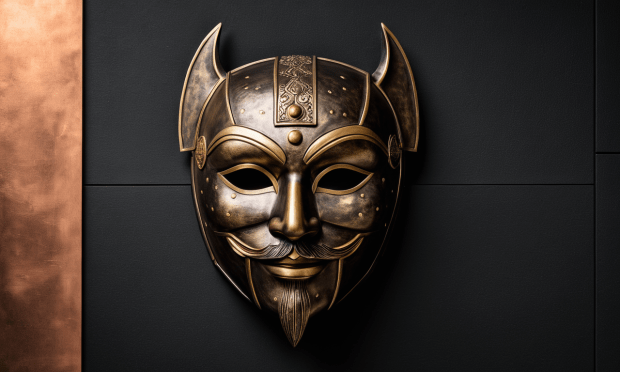
blend: ritual dusk color: tarnished bronze depth control: shallow foreground object: ceremonial mask with fractured symmetry background: blurred procession in muted tones lighting: indirect, low angle mood: solemn and suspended
Notes:
depth control: shallow foregroundensures the mask dominates the visual plane- The object obeys spatial placement without needing compositional commands
- The prompt remains rhythmically pure — no style contamination, no excess modifiers
===========================================
Noverra style prompt \:
Stijl (blend):
A ritual dusk atmosphere with subdued tension
(Color codex:)
tarnished bronze | muted copper | faded brass
(Subcommand:)
depth control: shallow foreground
(Object:)
ceremonial mask with fractured symmetry
Prompt + Echo
Style (blend):
A ritual dusk atmosphere with subdued tension
Color codex:
tarnished bronze | muted copper | faded brass
Subcommand:
depth control: shallow foreground
Object:
ceremonial mask with fractured symmetry
Model Setup:
RealVis XL V5 · CFG: 6.5 · Steps: 60 · Scheduler: DPM++ SDE Karras
LoRA: Art Deco, add-detail-xl (0.4), rdtdrp (0.8)
Resolution: 832 × 1216 px
not nessesary : but if you want, you find the models and loras (if you do not have them ) on the website from open-cource civitai.com/
