
Resolving Style Conflicts
What to do when styles conflict in AI image generation
When combining visual styles like Art Nouveau, geometric, Art Deco, Jugendstil, or even Cyberpunk, conflicts often arise. Some styles are organic and graceful, while others are stark and angular.
Without clear instructions, the AI will mix elements in a way that feels visually chaotic or inconsistent.
– Why conflicts arise
- Art Nouveau and Jugendstil use flowing lines, asymmetry and floral motifs
- Geometry and Art Deco are based on straight lines, symmetry and abstract shapes
- Cyberpunk often adds neon, glitch effects and visual noise to that
- The AI tries to process everything at once unless you explicitly direct what should be dominant
– Solution: Determine Dominance
- Choose one style as a visual basis
For example: geometry as structure, Art Nouveau as detail accent - Use prompt rules like:
- “Primary layout must follow geometric symmetry. Art Nouveau elements only allowed in accessories.”
- “Cyberpunk color palette only. No glitch textures. Use Jugendstil curves only in background.”
– Exclusions are key
- No floral motifs
- No curved lines (unless specifically allowed)
- No organic shapes
- No glitch overlays (in cyberpunk)
- No asymmetry (at geometric base)
– Example of a balanced blend
- Stylized illustration using a geometric Art Deco layout, with Jugendstil-inspired background curves. The subject is centered, framed by straight gold lines. No floral motifs. No curved lines in the foreground. Cyberpunk palette applied only to lighting and color accents.
– Prompt structure tip
follow a fixed rhythm:
Style Blend → Color Codex → Object Description
- Start with the dominant style
- Add secondary style with constraints
- Explicitly exclude unwanted elements
- Use color palette to connect styles
– Add Prompt Trigger application
- style=artdeco → activate “geometric layout, no curves”
- accent=Art Nouveau → add “background curves only”
- theme=cyberpunk → add “neon lighting, no glitch textures”.
– Common mistakes
- Activate all styles at once without hierarchy
- No exclusions → AI adds floral and glitch elements
- Too vague instructions such as “fusion” without structure
- No control over color application → styles clash visually
– Tip for visual harmony
Use color as a unifying element between styles. For example:
- Art Deco geometry in muted gold
- Art Nouveau background in teal
- Cyberpunk accents in neon magenta or midnight blue
This way you maintain stylistic purity and visual coherence.
Example: Art Nouveau × Cyberpunk × Geometry
Prompt (conflicted):
“Stylized illustration of a woman in profile, using a fusion of Art Nouveau, Cyberpunk, and geometric layout. She is surrounded by neon floral patterns, glitch textures, and flowing organic hair, framed by angular gold lines.”
What happens visually:
- Art Nouveau tries to add graceful curls, floral ornaments and asymmetry
- Cyberpunk injects neon colors, glitch effects and visual noise
- Geometry wants straight lines, symmetry and abstract shapes
The AI becomes visually overloaded :
- The geometric lines are overwritten by curls
- The glitch effects distort the face or background
- The floral patterns creep over the geometric edge
- Neon light reflects on organic shapes that you wanted to exclude
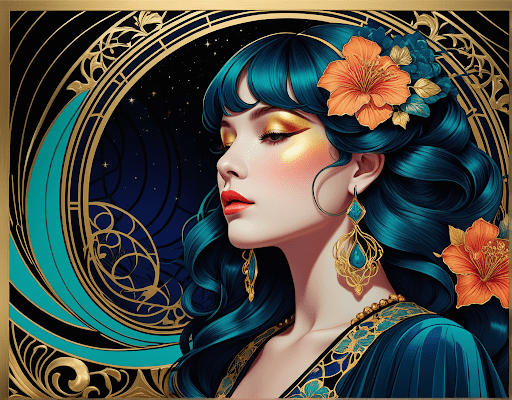
Result:
- The image feels chaotic
- The composition is inconsistent
- The style is unrecognizable — everything clashes
Solution:
- Choose one dominant style (e.g. geometry)
- Limit the other styles to specific zones:
- “Cyberpunk palette only in lighting accents”
- “Art Nouveau curves allowed in background only”
- Add exclusions:
- “No glitch textures on subject”
- “No floral motifs in foreground”
- “Hair must follow angular symmetry”
noverra follows a fixed rhythm:
Style Blend → Color Codex → Object Description
